Connect QynTro to Claude
Five clicks, about two minutes, on claude.ai or the Claude desktop app. You'll need a QynTro account (free works) and a paid Claude plan — custom connectors are a paid-plan feature on Claude's side.
Open Claude's Settings
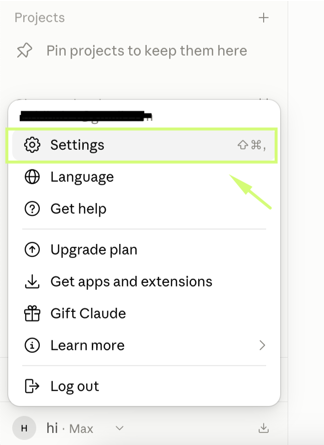
On claude.ai, click your initials in the bottom-left corner, then choose Settings.
Go to Connectors
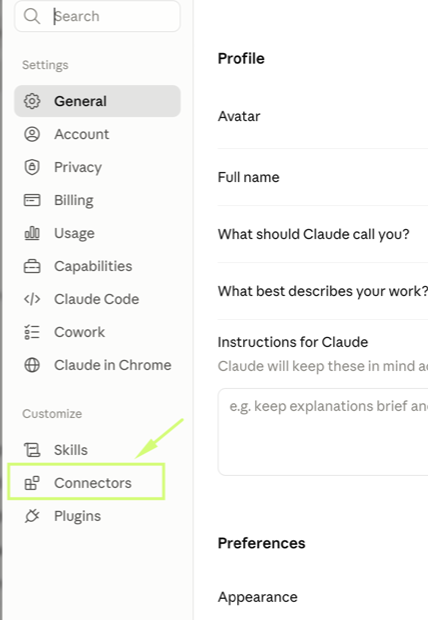
In the Settings sidebar, under Customize, click Connectors.
Click Add → Add custom connector
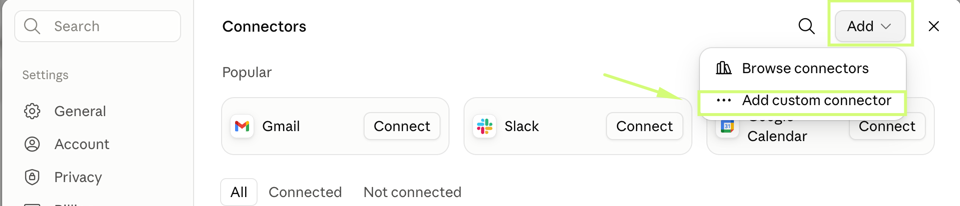
Top-right of the Connectors page: open the Add menu and pick Add custom connector.
Name it QynTro and paste the address
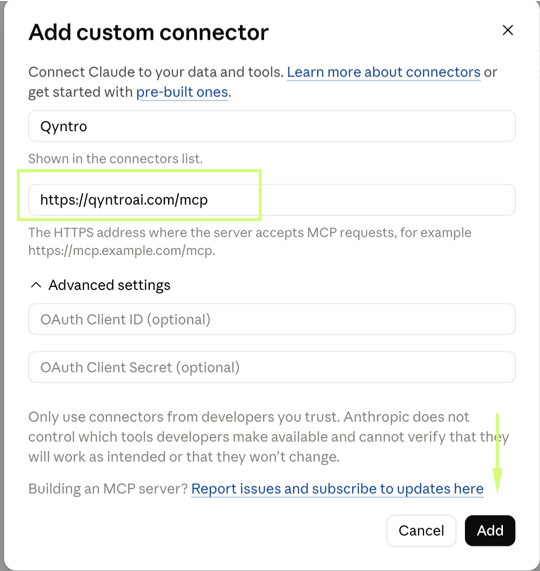
Name: QynTro · Remote MCP server URL: https://qyntroai.com/mcp —
leave the Advanced settings empty and click Add.
Click Connect, sign in, press Allow
Click Connect on the new QynTro card — a QynTro page opens. Sign in with your QynTro account if asked, then press Allow. That's it: you're live.
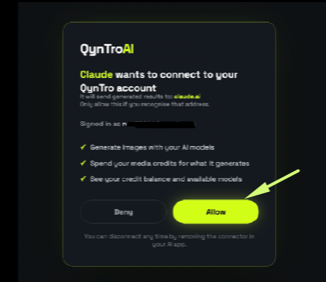
Tip: be signed in at qyntroai.com in the same browser first — then step 5 is a single click. You can disconnect any time from the same Connectors screen.
Just ask — say “QynTro”
Plain sentences work — no commands, no syntax. Mention QynTro by name in the prompt so Claude knows to use your connector instead of answering by itself:
Built-in cost safety: when you don't name a model or length, video defaults to a short 5-second clip on the cheapest capable model, and audio / 4K stay off unless you ask. You never burn credits by accident.
AI Images — 14 models by name
Name any model — casually or precisely — and that exact model runs. Sizes work the same way: “make it 16:9”, “portrait”, “square”. Up to 4 images per request.
Image models
ask “list the QynTro models” for live prices & sizes| Say this | Model | Best for | Cost |
|---|---|---|---|
| flux/schnell | FLUX Schnell | Instant drafts — 1 credit | cheapest |
| flux/dev | FLUX Dev | Balanced quality | low |
| flux-realism | FLUX Realism | Photoreal people | medium |
| flux-pro/new | FLUX Pro default | Best all-round | medium |
| gpt-image-2 | GPT Image 2 | Text in images, precise prompts | medium |
| gpt-image-1.5 | GPT Image 1.5 | Strong OpenAI quality | medium |
| gpt-image-1-mini | GPT Image Mini | Cheap OpenAI option | low |
| gemini-2.5-flash-image | Nano Banana Flash | Fast all-rounder · square only | low |
| gemini-3-pro-image-preview | Nano Banana Pro | Highest detail · square only | premium |
| core / ultra | Stability Core / Ultra | Art styles, 8 aspect ratios | low medium |
| sd3.5-large | SD 3.5 Large | Illustration | medium |
| sd3.5-large-turbo | SD 3.5 Large Turbo | Fast illustration | low |
| sd3.5-medium | SD 3.5 Medium | Budget illustration | low |
FLUX takes 6 aspect presets (square, 4:3, 16:9, portrait & landscape) · GPT Image takes square, 1536×1024 and 1024×1536 · Nano Banana is square-only · Stability takes 8 ratios from 9:21 to 21:9.
AI Video — charged per second
Say nothing about model or length and QynTro protects your wallet: 5 seconds on the cheapest capable model. Name a model and a length, and you get exactly that.
Video models · text to video
price = per-second rate × length| Say this | Model | Lengths | Cost |
|---|---|---|---|
| kling-video | Kling 1.6 Pro default | 5s · 10s | cheapest |
| kling-o3 | Kling o3 Pro | 5s · 10s | medium |
| kling-3-pro | Kling 3 Pro | 5s · 10s | medium |
| google-veo-31-fast | Veo 3.1 Fast | 4s · 6s · 8s | medium |
| seedance-2-fast | Seedance 2 Fast | 5s · 10s | high |
| kling-video-21-master | Kling 2.1 Master | 5s · 10s | high |
| google-veo-31 | Veo 3.1 · audio option | 4s · 6s · 8s | premium |
| google-veo3 | Veo 3 | 8s only | premium |
| minimax-video | MiniMax · Mochi · Hunyuan | fixed clip | low |
| luma-dream-machine | Luma Dream Machine | fixed clip · 6 ratios | medium |
Audio and higher resolution on the Veo models multiply the price up to ~3.5× — leave them off unless the shot needs them.
Video takes 1–4 minutes, so it renders in the background while you keep chatting:
You ask
“Use QynTro to make a 5 second video of ocean waves at dusk”
QynTro renders
You get a job id and the credit cost immediately
You collect
Ask “is my QynTro video ready?” — the finished link comes back
Failed renders refund themselves. You're only ever charged for video that actually arrives — the clip also waits in your QynTro library.
Image → Video — animate any picture
Turn a still image into a moving clip. It chains naturally: generate an image first, then animate the one you like — Claude passes the picture along for you.
You can also paste any public image URL. Same cost rule as video: no model named =
cheapest model, 5 seconds. Extra models here: kling-video-21-standard,
kling-video-21-pro, seedance-2-5 (480p/720p) and google-veo2.
Image requirements: a public https link to a PNG, JPEG or WEBP under 15 MB. Images you just generated with QynTro always qualify.
AI Music — original tracks
Describe the track — genre, mood, tempo, instruments — and ElevenLabs Music composes an original piece. 10 to 120 seconds, default 30. Vocals by default; say “instrumental” to skip them.
Tracks up to 30 seconds cost 2 media credits; 31–120 seconds cost 5. The call waits for the finished audio (30–90 seconds) — nothing is charged if composing fails. Need longer than 2 minutes? The QynTro dashboard goes up to 10.
AI Voiceover — text to speech
Turn any text into a natural MP3 voiceover with ElevenLabs and OpenAI voices. Ask for a gender and language and QynTro picks a matching voice — or name an exact voice from the list.
Different balance: voiceover spends character credits — 1 per character of text — a separate balance from your media credits. Check it any time in the QynTro dashboard.
One voice per request, MP3 output. The spoken language follows your text — the language you ask for is used to pick a matching voice.
AI Avatars — a presenter on demand
A studio-quality HeyGen avatar speaks your script to camera — perfect for promos, explainers and social clips. Start by seeing who's available:
A 300-character script ≈ 20 seconds ≈ 60 credits. Scripts up to 1,500 characters. Landscape (16:9) or portrait (9:16). Ask “list QynTro avatar voices” to choose the speaking voice — otherwise a clear English voice is picked for you. Failed renders refund automatically.
Presentations — a real .pptx
Give QynTro a topic and get back a finished PowerPoint file — researched content, themed design, download link in about a minute. The deck also stays editable in your QynTro dashboard.
Themes — dark and light, default highlighted:
Pricing: 2 credits per slide, +8 per slide when AI images are on. Default 6 slides, Medium detail, English, no images. Up to 20 slides text-only, 6 with images. Detail levels: Brief · Medium · Detailed · Extensive — and any language: “…in Hindi”, “…in Spanish”.
Credits & jobs, always in view
Images, video, music, avatars and presentations spend the media credits on your QynTro plan; voiceover spends character credits. Same balances as the dashboard — every reply states what it cost, so nothing is a surprise.
Job ids: plain numbers are text-to-video, i… is image-to-video, a… is an avatar
video. Anything that fails refunds itself automatically.
Get better results
Say “QynTro” in the prompt
“Using QynTro, …” routes the request to your connector every time — especially if you have other connectors installed.
Describe the shot, not just the subject
Light, mood, lens, camera move. “Slow push-in, golden hour, 85mm” beats “a dog”.
Draft cheap, finish premium
Explore with flux/schnell at 1 credit, then re-run the winner on flux-pro/new or Nano Banana Pro.
Chain image → video
“Create an image of a neon alley — then animate it into a 5 second video.” Claude passes the image along automatically.
Short scripts, cheap avatars
Avatar cost follows script length — 15 characters ≈ 1 second ≈ 3 credits. Tighten the script before rendering.
Iterate in the chat
“Same but at night”, “make it vertical”, “more cinematic” — it re-generates with your change.
Troubleshooting
Claude answers by itself instead of using QynTro
“Not enough media credits”
flux/schnell for images, kling-video for video, fewer slides, or a shorter avatar script.