Training Guide 08
AI Voiceover — studio narration from typed text
Type your script, choose a voice, and get a professional voiceover in seconds — the kind you'd otherwise book a voice artist for. This guide covers the voice library, the four settings that control the performance, and how to write a script that sounds natural when spoken aloud.
01 Before you start
Settings at the top, your script at the bottom.
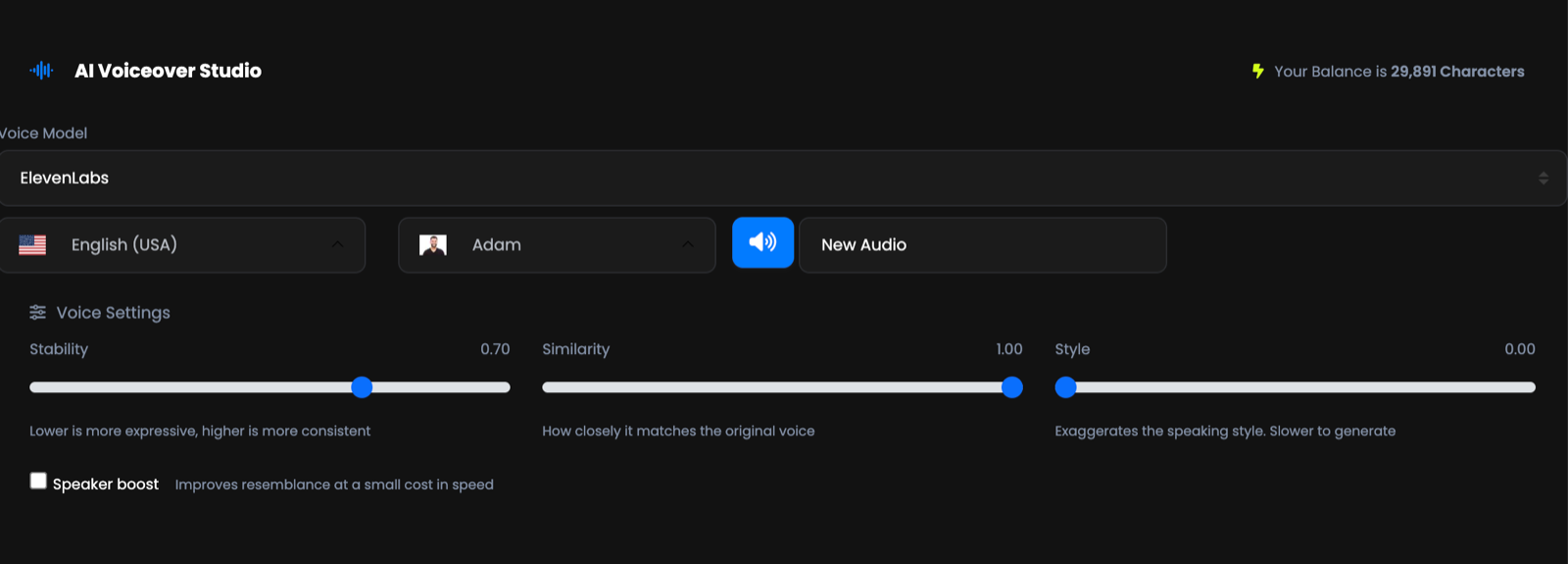
Voice Model
The engine that produces the speech.
Language, voice, and name
Three fields in a row, plus a blue speaker button to preview, and a name field for the audio you're about to make.
Voice Settings
Four controls that shape the performance. Covered in detail below.
Format, then your script
Choose the file type, type what you want said, press Synthesize.
02 Your first voiceover
Under a minute, start to finish.
Pick your language, then your voice
Press the speaker button to hear it before committing. Auditioning voices is free.
Name the audio
The field marked New Audio. Name it properly and you'll find it later.
Leave the settings alone the first time
The defaults are good. Change them once you know what you want to be different.
-
Type your script and press Synthesize
Introducing our new vitamin C serum. Three drops every morning, and your skin will thank you.
03 Choosing a voice
Every voice comes with a description — use them.
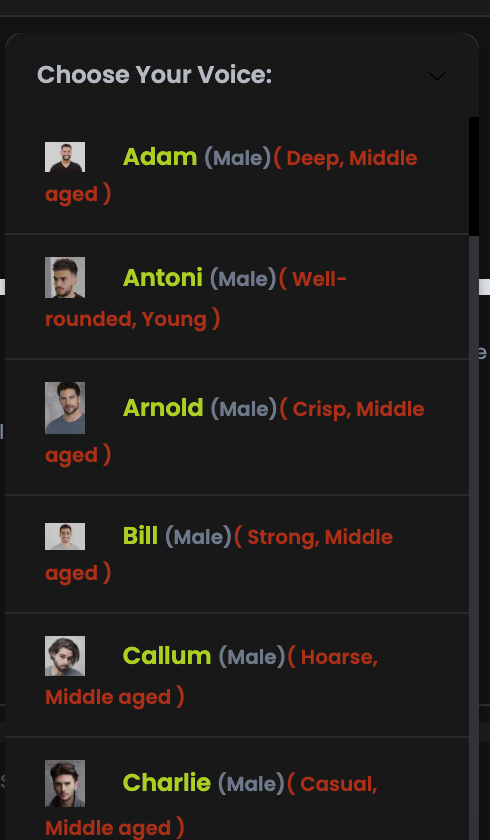
The list isn't just names. Adam is deep, middle aged; Antoni is well-rounded, young; Arnold is crisp; Callum is hoarse; Charlie is casual. Those tags are the fastest way to shortlist — then preview the two or three that fit.
| You're making… | Look for |
|---|---|
| A product ad or brand video | Warm, well-rounded, confident — not too characterful |
| A tutorial or explainer | Clear and crisp. Comprehension beats personality. |
| A podcast intro or trailer | Deep, strong — something with weight to it |
| Social content | Casual and young. Formal narration reads as an advert. |
A stock sample always sounds good. Paste one real sentence from your script and synthesize it with two different voices — the differences that matter only show up on your own copy.
04 The four voice settings
This is where a good voiceover becomes the right one.
| Setting | Default | What it does, and when to move it |
|---|---|---|
| Stability | 0.70 | Lower is more expressive, higher is more consistent. Drop it for storytelling and adverts where you want emotion; raise it for long narration where an even read matters more. |
| Similarity | 1.00 | How closely the output matches the original voice. Leave it high unless the delivery sounds strained. |
| Style | 0.00 | Exaggerates the voice's speaking style. A little goes a long way, and it's slower to generate. Start at 0 and add in small steps. |
| Speaker boost | off | Improves resemblance to the source voice at a small cost in speed. Worth turning on for final renders. |
Change one at a time and re-synthesize the same short sentence. Stability is the one you'll adjust most; the others rarely need touching. If you change three settings at once and it sounds worse, you've learned nothing.
Expressive sounds great on one sentence and exhausting over two minutes. For anything long, keep stability high — consistency is what makes narration easy to listen to.
05 File formats
Four options. Two of them matter.
🎵MP3
The default and the right answer for almost everything — small, universal, good quality.
💿WAV
Uncompressed. Choose it when the audio goes into a video editor and will be processed further.
🌐OGG
An open format, occasionally required by specific web or game engines.
📼WEBM
For web embedding in particular workflows.
06 Writing for the ear
Text that reads well often speaks badly. These fixes take seconds.
Short sentences, one idea each
Long clauses that work on a page lose a listener halfway through.
Punctuate for breath
Commas and full stops become pauses. Add them where you'd naturally breathe, even if a copy editor would object.
-
Spell tricky words the way they sound
Nobody sees the script, so write whatever produces the right sound.
QynTro → Quin-Tro Write out numbers and symbols
"twenty per cent off" and "twenty-four seven" beat "20% off" and "24/7".
Avoid brackets, bullets and slashes
They have no spoken equivalent, so they're either skipped or mangled.
Read your script out loud before you synthesize. If you stumble, the AI will too — and fixing the sentence costs nothing, while re-synthesizing costs characters.
07 Working in lines
The script area is line-based, and that's more useful than it looks.
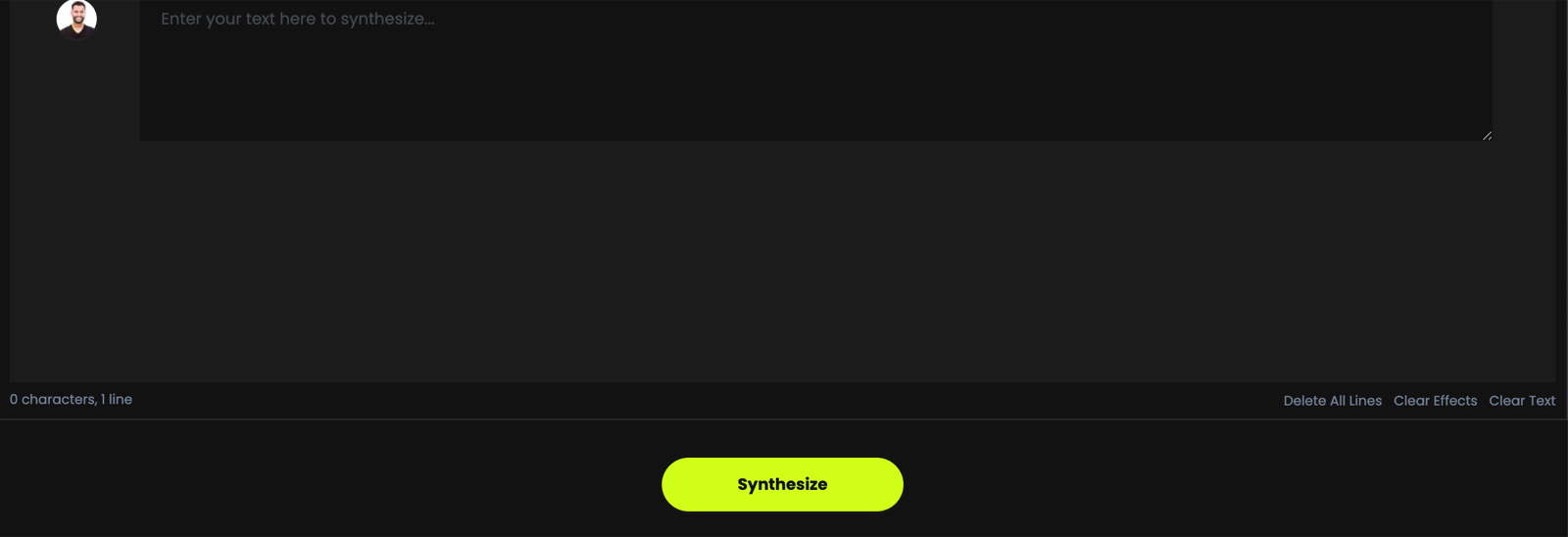
Each line carries its own voice avatar, so a script isn't limited to one narrator — that's the basis for a two-person conversation, an ad with a narrator and a customer, or a character script, all produced in one pass.
Three controls sit under the box:
- Delete All Lines — clear the whole script and start again.
- Clear Effects — reset the per-line settings without losing your words.
- Clear Text — empty the text but keep your setup.
"0 characters, 1 line" under the box is your running cost. Because voiceover is billed per character, this number tells you exactly what a synthesis will use before you press the button.
08 Characters, not credits
A different currency from the rest of QynTro.
AI Voiceover is billed in characters — every letter, space and punctuation mark in your script. Your balance sits at the top right of the page, and it's a separate pool from media credits (images and video) and word credits (chat and writing), so heavy voiceover use doesn't eat into anything else.
- Tighten before you synthesize. Cutting 200 unnecessary characters is free; re-recording them isn't.
- Test with one sentence. Audition voices and settings on a short line, then run the full script once.
- Download and keep it. Re-synthesizing something you already made costs characters again.
09 Troubleshooting & FAQ
The questions we're asked most.
A word is pronounced wrongly
Spell it phonetically — "Quin-Tro" instead of "QynTro". Hyphens and spaces help too. Nobody reads the script, so write for the sound.
The delivery is flat
Lower Stability a little and re-synthesize the same sentence. Also check your punctuation — a script with no commas gives the voice nowhere to breathe.
It sounds over-acted
The opposite fix: raise Stability and bring Style back towards zero.
The pauses are in the wrong places
Pauses come from punctuation. Add a comma where you want a short pause and a full stop where you want a longer one. Splitting a long sentence in two is usually the cleanest fix.
Which format should I download?
MP3 unless you're editing it further, in which case WAV.
Can I use these voiceovers commercially?
Yes — audio you generate is yours to use in client work, ads and monetised content.
Can I make a voiceover in another language?
Yes. Change the language field and choose a voice for that language. Have AI Chat translate your script first, then paste it in.